FAQ
This page collects the questions that are easy to get stuck on during setup or right before publishing.
Installation and publishing
Supported package combination when used together with LuminousHotel
If you combine LuminousOasis with the hotel, only the Full Pack configuration is supported.
Condominium_701
SimpleRoom_702
LuminousHotel_FullPack
Import those first, and then import:
LuminousOasis.unitypackage
TextMeshPro text looks broken
Run Import TMP Essentials from the TMP Importer, or install TextMeshPro from the Unity Registry in Package Manager.
The scene does not open correctly
Open scenes by double-clicking them in the Project window. If you drag and drop them, Unity treats them as a multi-scene setup and the scene can end up in an unintended state.
Errors appear when entering Play mode or uploading, and the world will not start or upload
After adding or deleting assets, Scene ID conflicts can sometimes occur, which may prevent Unity play mode or VRChat uploads from working correctly.
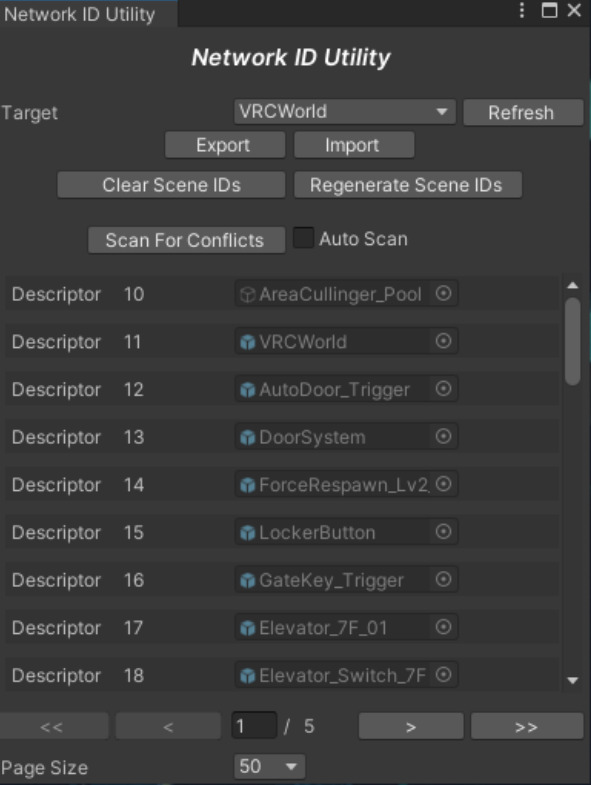
In that case, open Network ID Utility and click Regenerate Scene IDs.
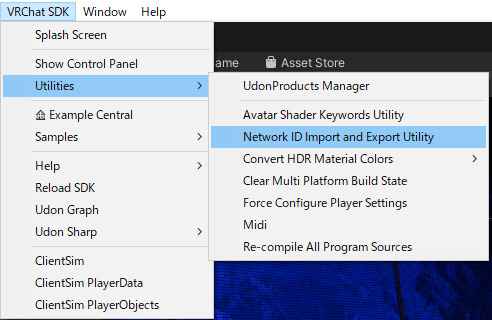
- Open VRChat SDK > Utilities > Network ID Import and Export Utility
- Confirm that the target is set to VRCWorld
- Click Regenerate Scene IDs
- Save the scene if needed, then try playing or uploading again